Dental fee schedules, ready to import in minutes.
Upload the PDF or fax from any insurance company. Get a clean file of every CDT code and fee for Dentrix, Open Dental and more. No more typing fees in by hand.
No sign-up. No credit card. Upload a fee schedule and preview the result in minutes.
D0120,38.00
D0274,62.00
D1110,89.00
D2740,845.00
Built specifically for fee schedules. Even works on faxes.
General PDF converters and OCR tools give you a jumble of text and broken tables that still need hours of cleanup. Fee Schedule Pro does one job: getting every CDT code and fee right, then telling you what to double-check.
- Reads blurry scans and faxes
- Matches each code to its fee
- Leaves out notes, discounts and other unwanted data
- Several plans side by side, one file each
- Checks every code against the current CDT code set
- Ready to import into your software
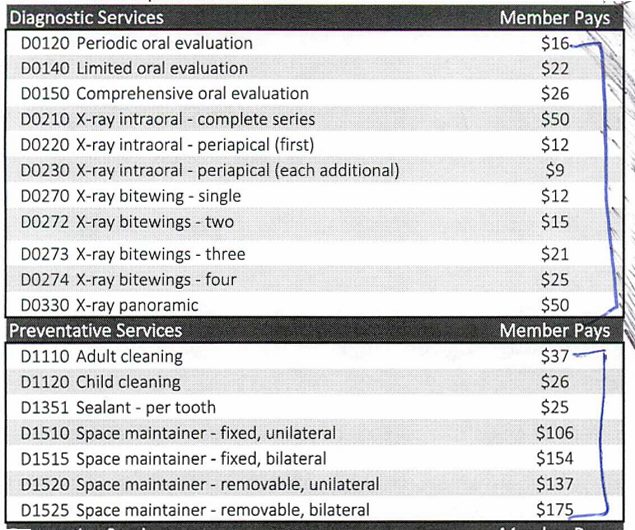 D0220 · 12.00
See every code and fee before you buy.
Every converted fee schedule opens on its own review page, with your original PDF on one side and the converted codes and fees on the other. Look through the whole result at your own pace. You only pay for the download once you've seen exactly what you're getting.
| Code | Fee |
|---|---|
| D0120 | 41.00 |
| D0150 | 72.00 |
| D0210 | 112.00 |
| D0274 | 58.00 |
| D1110 | 94.00 |
| D1120 | 68.00 |
| D1206 | 34.00 |
| D2391 | 128.00 |
| D2740 | 865.00 |
| D2950 | 189.00 |
Decide the 3 marked in yellow. Blue notes are good to know: no action needed.
- D2950 · Hard to read Show in PDF · p. 9
- D4341 · Fee far from normal: $1,850.00 (usual range $150 to $260) Show in PDF · p. 6
- D7140 · Listed twice with different fees Show in PDF · p. 11
5 codes left out: the schedule marks them Not Covered.
D1352 kept, though it was retired from CDT in 2026.
Anything worth a second look is pointed out for you.
Every result comes with an accuracy report. It tells you when a file is ready to download, and flags anything to settle first, so nothing gets past you.
- To check: a line that's hard to read, a fee far from normal, a code listed twice.
- Good to know: codes the schedule marks Not Covered, retired codes, the schedule's own notes.
- Ready to download when there's nothing left to review.
How it works
- 01
Upload
Add the PDF, scan or fax the insurance company sent you.
- 02
Review
Check every code and fee side by side with the original, guided by the accuracy report.
- 03
Download
Get a clean, import-ready file of codes and fees.
- 04
Import
Load it into Dentrix, Open Dental or your practice software. Import guides
Want to see it first? Try a fee schedule free, with no sign-up →
See each step in detail
Pay per fee schedule
- No subscriptionNo monthly fees and nothing that renews.
- Pay only for what you needBuy one fee schedule or a few dozen.
- Per schedule, not per pageA 40-page fee schedule costs the same as a 4-page one.
- Never expiresBuy ahead and use them when new schedules arrive.